[!] Do you have lag in the game?
As there are many complaints about the lag of people with Internet in Orange, I decided to make a small guide describing how to avoid them.
Informacja: the method can also work for people who have internet from another provider, but also have lags / freezes.
1.First we download the programWTFast, you can download it here:
https://www.wtfast.com/Download/Start
2.We install it and turn it on.
3. W "account type" zaznaczamy "free trial user" i klikamy "login":
![[IMG]](https://www.turkeyonline.fun/memsoria-img.php?path=images%2Ffascik%2F1.png)
4. Forznaczamy "custom games" i klikamy przycisk "add"
![[IMG]](https://www.turkeyonline.fun/memsoria-img.php?path=images%2Ffascik%2F2.png)
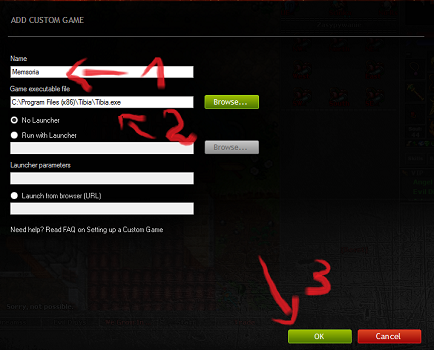
5.Enter any game name (1).
Enter the path to the Tibia file (e.g. Tibia.exe, Turkey Online.exe)(2).
Klikamy "OK" (3).
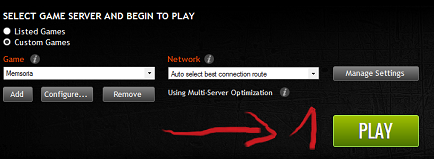
6. Klikamy przycisk "PLAY":
7. There should be an error:

Or something like this:

8.Done! We minimize the program and turn on tibia as if we were logging into Turkey Online normally. Problem solved!
